|
<< Back
Links
link
link
link
link
link
link
|
SetiSpy is a tool that allows you to monitor the progress of your Seti client. It also displays individual and team stats.
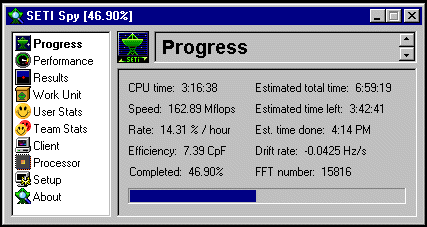
This is the Progress screen, it gives you information on the progress of the current work unit.
- CPU time - Shows how much time has already been spent on the work unit.
- Speed - Shows how fast your processor is processing the work unit in Mflops (millions of floating point operations per second).
- Rate - Shows how many percent per hour your computer is processing the current work unit.
- Efficiency - Shows how many clock cycles it takes you processor to complete one flop (floating point operation).
- Completed - Shows what percentage of the current work unit has been completed.
- Progress Bar - Graphically shows how much of the current work unit has been completed.
- FFT number - Shows what FFT the client is working on.
- Drift rate - Shows the current drift rate.
- Est. time done - Shows the estimated completion time of the current work unit.
- Estimated time left - Shows the estimated length of time until the current work unit is completed.
- Estimated total time - Shows the estimated total of the work unit.
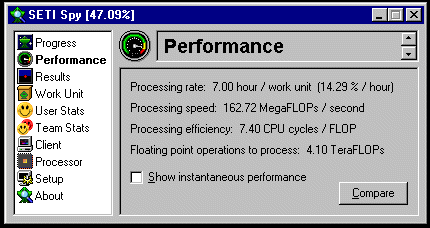
This is the performance window, it gives you information on the current performance of you machine.
- Processing rate - Shows how fast your computer is processing the current work unit.
- Processing speed - Shows how many MegaFLOPS per second your computer is calculating.
- Processing efficiency - Shows how many clock cycles it takes your CPU to complete one flop.
- Floating point operations to process - Displays the total number of flops to be performed.
- Show instantaneous performance - Displays current data instead of averaged data.
- Compare - Displays the below window.
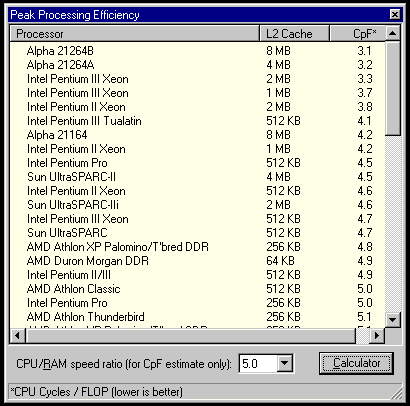
This is the peak processing efficiency window, it gives you information on how efficient various processors are.
- CPU/RAM speed ratio - Lets you adjust the CPU/RAM speed ratio so that you can see the Cpf of various processors
- Calculator - Displays the below window.
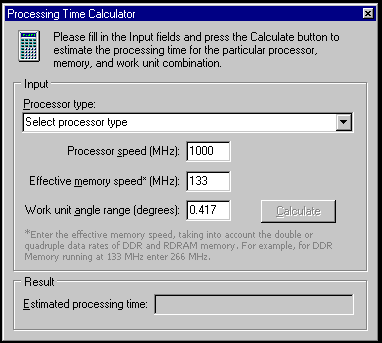
This is the Processing Time Calculator, It will allow you to calculate how long various processors take to complete a work unit.
- Processor type - Select a type of processor to find out how much time a work unit will take to complete on it.
- Processor speed - Enter the processor clock speed in MHz.
- Effective memory speed - Enter the effective memory speed in MHz.
- Work unit angle range - Enter your desired angle range (.417 is default).
- Calculate - Calculates about how long a work unit of that angle range will take to complete on the processor you selected.
|
